Receiving parcels
From planning your collection to changing the delivery
As the recipient, you’re in control at Planzer Parcel. At least when it comes to the delivery. On our recipient portal, you’ll find a range of practical options to help you get your hands on your parcel as quickly and smoothly as possible. The link in the email or SMS notification we send takes you straight to our recipient portal where you can use the relevant services.
Recipient portal
Recipient portal
- Track your shipment
- Postpone the delivery date
- Allow your shipment to be left in a safe place, provided the sender has not prohibited this option
- Request redelivery if you were absent the first time
- Retrieve proof of delivery or a photo of your parcel left in a safe place
NEW Planzer Parcel shop
The service that allows you to forward your parcel to one of over 600 collection locations in Switzerland and collect it there.
Recipient options
Track, manage, redirect – it’s all in your hands
As soon as your parcel is on its way to you with Planzer Parcel, you will receive an email or SMS notification from either the sender or from us, which will contain a link. This will take you to our recipient portal, where you can configure various settings or access information. The options available to you depend on what the sender of your parcel has agreed to.
1. Track your shipment
You can use the tracking number to track the location and status of your parcel around the clock.
To do so, enter your tracking number in the field below.
Under ‘Shipping’ and ‘Shipping route’, you will find detailed information about your parcel. Please note: for security reasons, you must log in using the link in the email or SMS that you receive in order to make changes to the delivery (e.g. change the delivery date).
2. Have the shipment redelivered or collect it from a Planzer Parcel shop
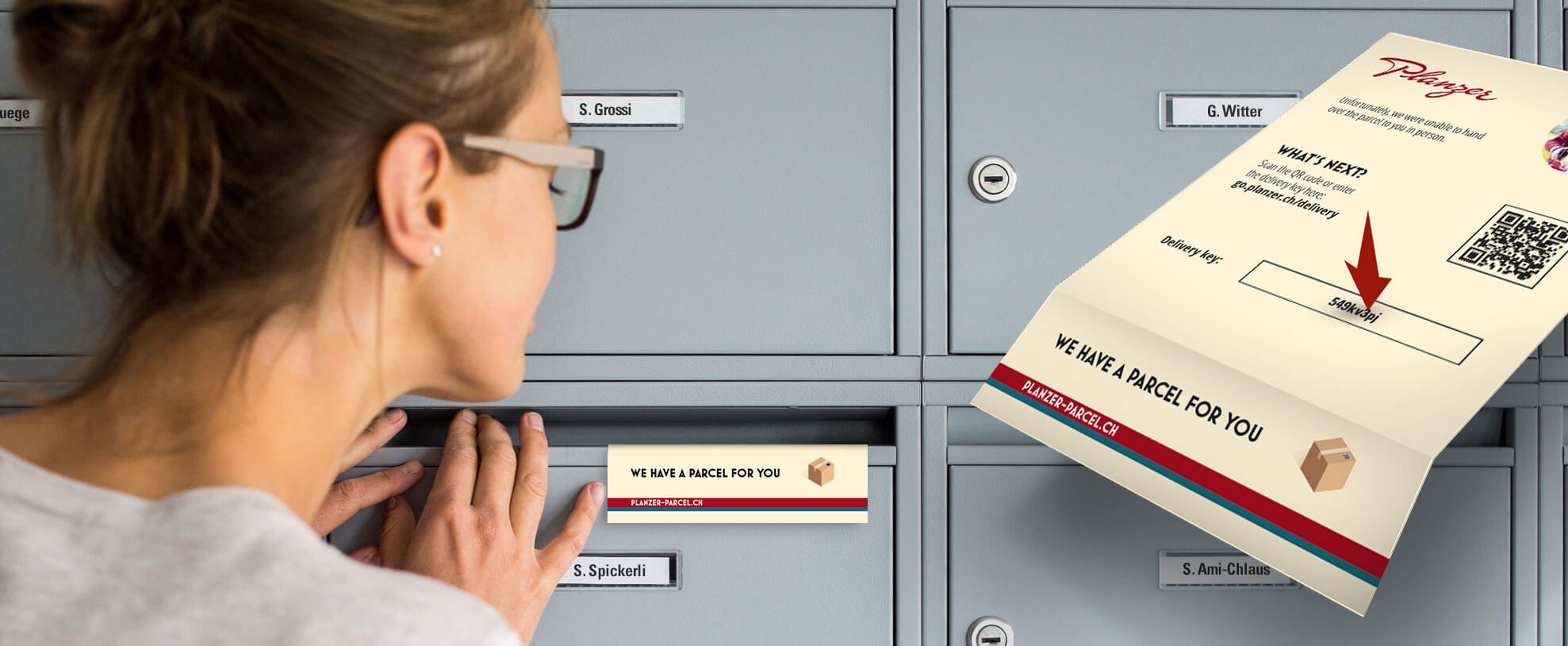
If you are not there during the first delivery attempt, we will leave a delivery card in your letterbox. On this card, you will find a delivery code that you can use to access the recipient portal. You can also use the link that you will have received from us by email or SMS. Visit our recipient portal to find out how to arrange a second delivery or organise a collection from a Planzer Parcel shop.
3. Request that parcels be left in a safe place
In the recipient portal, you can ask us to leave your parcel in a safe place. Under ‘Shipping information’, select the place you would like us to leave your parcel.
Note: If this option is not available or appears grayed out, the sender of your parcel has prohibited the option to leave your parcel in a safe place. In this case, please contact your sender directly.
A general drop-off authorization is possible provided that the sender has not imposed a drop-off restriction and you are registered in the recipient portal.
Important: the general drop-off authorization is only valid for your registered email address.
More information can be found here.
4. Download proof of delivery or a photo of your parcel left in a safe place
If your parcel has been left in a safe place, you will receive an email or SMS containing a button or link. This will take you to the recipient portal, where you can download your proof of delivery or the photo of your parcel left in a safe place under ‘Delivery confirmation’.
Is there something you need help with?
You want to receive your parcel quickly and without a hitch, which we also want. If you have any questions about getting your delivery or need help, you can find useful information and contact details here.
Latest news and useful information
A look behind the scenes
In our stories and on the Planzer blog, you can find useful information, the latest news and future developments first-hand.
Innovation
We have set the future of parcel delivery in motion: with the ‘Planzer – Dynamic Micro-Hub with LOXO’, we are testing out highly automated driving in Bern’s city centre.

